Pink Peonies Watercolor PNG: Integrating Floral Assets into Modern Design Workflows
Digital creatives frequently reach a point where stock photography feels too rigid and vector illustrations lack the organic warmth a project demands. A Pink Peonies Watercolor PNG file bridges that gap. It delivers the soft, hand-painted quality of traditional watercolor in a format that slots directly into layered designs. Whether you are building a wedding invitation suite, refreshing a blog's seasonal header, or crafting packaging mockups for a beauty brand, understanding how to source, evaluate, organize, and deploy these assets saves hours of frustration and produces a more polished result.
This article moves beyond simple file descriptions. It examines how pink peony watercolor graphics function inside real workflows, how they interact with the tools you already use, and what practices keep a growing asset library manageable over time.
Understanding the Pink Peonies Watercolor PNG Asset Type
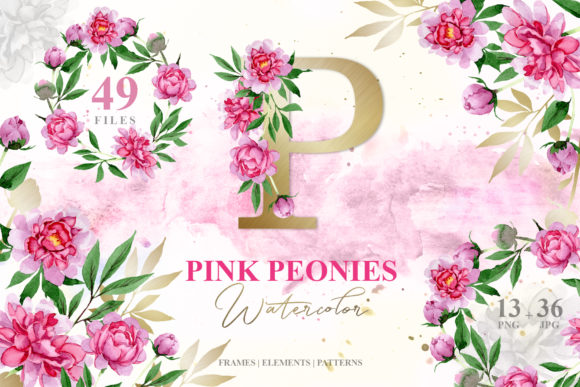
A Pink Peonies Watercolor PNG is a raster image file that preserves the translucent washes, subtle blooms of pigment, and irregular edges characteristic of physical watercolor painting. The PNG container matters because it supports an alpha channel for transparency. Unlike a JPEG, which bakes a white or colored background into the file, a PNG lets you place a blush-pink peony blossom directly onto a cream cardstock background, a dark website hero section, or layered over typography without a visible bounding box.
These files typically originate from one of two sources: high-resolution scans of actual paintings, or digital paintings created with raster software and watercolor-style brushes. Both approaches aim to replicate the luminosity and texture of traditional media. When you encounter a set labeled Pink Peonies Watercolor PNG, you are looking at files that have already been isolated from their original background—the artist or supplier handled the extraction so you can skip the tedious clipping path work.
Resolution varies widely across sources. A 300 DPI file sized at 2000 pixels or more on the longest edge provides enough data for print projects at modest dimensions. Files below 1000 pixels suit screen-only applications. Knowing the intended output before purchasing or downloading prevents pixelation surprises during layout.
Where Floral PNG Assets Fit in a Broader Creative Process
These assets rarely constitute a project by themselves. They serve as compositional elements that support a larger visual goal. Recognizing where they enter the workflow helps with planning and prevents last-minute scrambling for compatible files.
Concept and Mood Board Development
Before committing to a full design, many creators assemble mood boards in tools like Milanote, Canva, or physical printouts. Dropping several Pink Peonies Watercolor PNG variations onto a board alongside typography samples, color swatches, and texture references clarifies whether the peony's particular shade of rose works with the palette. This early filtering step prevents the sunk cost of building a design around an asset that ultimately clashes.
Execution and Composition
During active design work, pink peony watercolor elements act as focal points, corner embellishments, or background texture layers. A logo designer might tuck a single blossom behind a serif wordmark at 15% opacity. A social media manager creating Instagram quote graphics may rotate a peony cluster 45 degrees and place it in the lower left to balance a block of centered text. The transparency inherent in the PNG format makes these adjustments non-destructive; you can reposition, scale, and recolor with adjustment layers without permanently altering the original asset.
Post-Project Repurposing
One well-chosen Pink Peonies Watercolor PNG can serve multiple outputs from a single project. The invitation design becomes a matching thank-you card, a coordinating envelope liner pattern, or a website announcement banner. Saving the original layered working file lets you extract individual elements for reuse months later without starting from scratch.
Compatibility Across Software and Platforms
Watercolor peony PNGs integrate smoothly into most modern design environments precisely because the format is universally supported. This compatibility reduces friction when moving between applications within a single project.
In Adobe Photoshop, the files import as standard layers. Layer masks, blend modes, and hue/saturation adjustments give precise control over how a pink peony interacts with the composition. Multiply blend mode, in particular, preserves the watercolor's translucent quality while allowing the background to show through the lighter washes—exactly as real watercolor behaves on paper.
Canva users upload Pink Peonies Watercolor PNG files directly to their media library. Canva's background remover tool becomes unnecessary because the PNG already carries transparency. From there, the assets drop into any template, and the platform's built-in effects—shadows, duotone filters, and opacity sliders—expand the creative possibilities without external software.
Procreate and other raster illustration apps on iPad treat these PNGs as insertable images. Artists often import a peony watercolor clip art file, scale it, and then paint over it or use it as a reference while creating coordinating elements in the same hand-painted style. This hybrid approach maintains visual consistency across a suite of custom and purchased assets.
For web and presentation platforms like Google Slides, PowerPoint, or WordPress block editors, the upload process is identical to any standard image. The transparency means peony graphics layer neatly over colored backgrounds, gradient headers, or hero sections without requiring CSS tricks or additional image editing.
Organizing a Growing Collection
A scattered downloads folder full of vaguely named PNGs undermines the efficiency these assets are meant to provide. Implementing a folder and naming convention early—even a simple one—saves significant time when searching for the right file under deadline pressure.
One effective method groups assets by subject, then by color family, then by supplier. A path might look like:
- Florals / Pinks-Peonies / CreatorName / PN-Peony-FullBloom-300dpi.png
- Florals / Pinks-Peonies / CreatorName / PN-Peony-Bud-300dpi.png
- Florals / Pinks-Peonies / CreatorName / License.txt
Keeping the license file in the same directory eliminates guesswork about usage rights six months later. For those using cloud storage, tagging files with descriptors like "peony," "watercolor," "pink," and "floral" in services that support searchable metadata makes retrieval faster across devices.
Some teams maintain a shared asset library on a network drive or cloud service with read-only access for team members and write access limited to designated managers. This prevents duplicate purchases and ensures everyone uses the same quality-controlled versions.
Quality Control and Selection Criteria
Not every Pink Peonies Watercolor PNG on the market meets professional standards. Evaluating files before integrating them into client work or published materials avoids awkward conversations about blurry prints or harsh cutout edges.
Zoom to 100% or higher and inspect the edge quality. A well-isolated watercolor PNG retains a soft, feathered transition at the petal edges. Overly sharp or jagged edges suggest automated background removal that stripped away the subtle washes that give watercolor its character. Check for fragments of a white or off-white background lurking in crevices—areas where the flower folds inward often trap remnants from the scanning or extraction stage.
Assess the color fidelity across the set. A bundle with inconsistent color temperatures—some peonies leaning warm peach while others sit in cool magenta—limits compositional flexibility. Cohesive sets simplify the design process because you can combine elements without color correction gymnastics.
Licensing deserves careful attention. Some creators allow commercial use with attribution; others sell extended licenses for physical merchandise or large print runs. A Pink Peonies Watercolor PNG purchased for a personal blog header may not carry rights to appear on 10,000 product labels. Reading the license before the project advances to production prevents legal exposure and respects the artist's terms.
Workflow Integration: Practical Scenarios
Seeing how pink peony watercolor graphics move through actual workflows clarifies their practical value beyond the theoretical.
Scenario A: Wedding Stationery Designer. A designer receives a client brief with a dusty rose and sage palette. She sources a Pink Peonies Watercolor PNG bundle containing full blooms, buds, and loose petals. In Adobe InDesign, she builds a invitation master page, placing peonies asymmetrically along the left margin at varying scales. She sets the PNGs to 80% opacity so the blooms recede behind the typography. The same assets flow into matching table numbers, menu cards, and a wedding website design she creates in a separate application. Because she worked with transparent PNGs from the start, each output maintains the same luminous quality regardless of the background color.
Scenario B: Content Marketer. A beauty blog runs a seasonal series on floral skincare ingredients. The marketer downloads a Pink Peonies Watercolor PNG set, imports it into Canva, and creates a reusable blog header template. Each week, she swaps the featured text while keeping the peony framing consistent. The series builds visual recognition with readers. When the campaign wraps, she repurposes the peony graphics in promotional Pinterest pins, maintaining brand continuity without commissioning a new illustration.
Scenario C: Small Business Owner. A soap maker launches a peony-scented product line. She uses pink watercolor peony PNGs on product labels designed in a basic graphics program, on her Shopify product pages, and in email newsletter headers created through Mailchimp's template editor. The consistent floral motif ties the line together across touchpoints. Later, she works with a local printer to produce hang tags using the same files, requesting a proof to confirm the soft watercolor gradients reproduce cleanly on uncoated paper stock.
Efficiency Through Templates and Reusable Systems
Integration deepens when pink peony watercolor assets become part of a templated system rather than a one-off decoration. Building a few master templates for recurring content types—social media quotes, event flyers, blog graphics—creates a framework where team members with varying design skills can produce consistent work.
A template file might contain:
- Pre-positioned Pink Peonies Watercolor PNG layers locked as non-editable reference elements
- Designated text areas with pre-set fonts, sizes, and colors
- Approved color palette swatches sampled from the peony's pink tones
- Export presets configured for the target platform
This approach shifts the creative burden from reinvention to adaptation. Someone who needs to create a Tuesday promotional graphic opens the template, updates the text, adjusts the layout slightly if needed, and exports. The design stays within brand guardrails because the foundational elements are already locked in place.
Long-Term Use and Archival Practices
Digital assets have a lifespan. A Pink Peonies Watercolor PNG purchased today should remain accessible and usable years from now. This requires lightweight archival habits that protect against data loss and format obsolescence.
Store the original download in a compressed archive alongside the license file. Keep a copy in a cloud backup service separate from the working files on your computer. If the supplier provides updates—such as higher-resolution versions or additional coordinating elements—replace the archive while keeping the previous version as a fallback.
Document the source. A simple spreadsheet or notes file listing the supplier name, URL, date of purchase, license type, and any attribution requirements serves as a reference for yourself and any collaborators who may access the files later. This documentation becomes especially valuable when a team member leaves or when a client requests the original asset information for their own records.
File formats evolve, but PNG has been an internet standard since the mid-1990s and shows no signs of disappearing. The format's openness and widespread support make it a safe archival choice compared to proprietary formats tied to specific software.
Collaboration and Team Integration
When multiple people share access to a library of Pink Peonies Watercolor PNG files, a few coordination practices prevent confusion. A shared drive organized by project or asset type works well for small teams. Larger organizations benefit from a digital asset management platform that supports tagging, previews, and access controls.
Communicate which watercolor peony assets are approved for which contexts. A team social media manager may freely use a specific bundle on Instagram, but needs approval before applying the same graphics to paid advertising or product packaging where licensing terms might differ. This clarity protects the organization and respects creator rights.
Version control matters when team members edit assets. The rule is simple: never overwrite the original. If someone needs a desaturated version of a peony for a particular project, they save that derivative with a descriptive filename in the project folder, leaving the master file untouched in the shared library. Others can then build their own variants without inheriting someone else's adjustments.
Integrating a Pink Peonies Watercolor PNG into a professional workflow is less about the file itself and more about the systems built around it. The right asset, stored in the right place, with clear usage parameters, and deployed through repeatable processes, transforms a beautiful illustration into a reliable production tool. The peony becomes a small but consistent thread in a larger creative output—quietly doing its work while you focus on the message it supports.