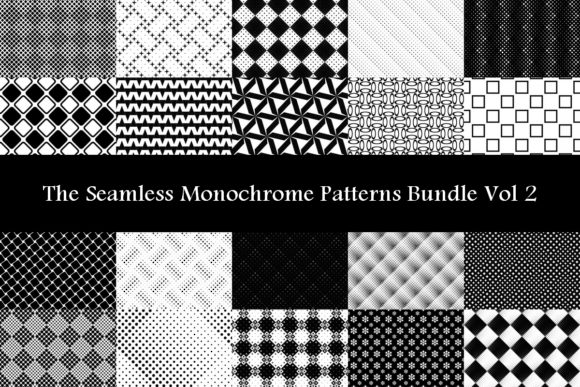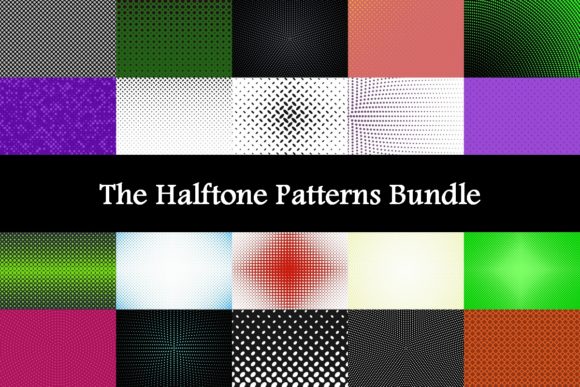
The Halftone Patterns Bundle
The Halftone Patterns Bundle is a curated collection of vector-based halftone textures and overlays designed for use in graphic design, illustration, print production, and digital art workflows. It typically includes scalable patterns—such as dot, line, and elliptical halftones—at various frequencies, angles, and densities, delivered in formats like AI, EPS, SVG, and sometimes PNG or PSD. Unlike single-pattern downloads, the bundle offers systematic variation across tone values (e.g., 10%, 30%, 50%, 70%, 90% black) and stylistic approaches, enabling consistent application across projects.
Why Designers and Artists Consider This Bundle
Halftone effects remain relevant for achieving specific visual outcomes: simulating vintage printing techniques, adding tactile texture to flat graphics, creating controlled gradients without raster artifacts, or reinforcing retro or analog-inspired aesthetics. Designers working on album covers, editorial layouts, branding for craft-focused businesses, or screen-printed apparel often seek reliable, editable halftone assets. The Halftone Patterns Bundle responds to that need—not by replacing manual halftone generation in software like Adobe Photoshop or Illustrator, but by offering production-ready alternatives that save time and reduce trial-and-error.
Users commonly explore this bundle when they need consistency across multiple deliverables (e.g., matching halftone tones in a logo, business card, and poster), require vector scalability for large-format output, or lack the technical confidence to build custom halftones from scratch using gradient meshes or pattern brushes.
Practical Benefits and Realistic Tradeoffs
One key benefit is efficiency: applying a pre-made vector halftone overlay avoids the learning curve associated with generating accurate, print-safe halftones manually. Because the patterns are vector-based, they scale infinitely without pixelation—making them suitable for both web UI elements and billboard-sized prints. Many bundles also include documentation or suggested usage notes, helping users understand optimal line frequencies for different output methods (e.g., 30–45 lpi for newsprint versus 133–150 lpi for high-end offset).
However, there are tradeoffs. The Halftone Patterns Bundle does not adapt dynamically to image content—it’s a static overlay. That means it won’t auto-generate halftone versions of photographs the way a Photoshop filter might. Users must manually align, mask, or layer it over artwork, which requires basic familiarity with layer blending modes (e.g., Multiply, Color Burn) and clipping masks. Additionally, while vector patterns avoid resolution limits, they may introduce unexpected rendering quirks in some PDF viewers or older RIPs if complex transparency or clipping paths are used extensively.
Another consideration is stylistic scope. Bundles vary in aesthetic range: some emphasize clean, geometric precision; others lean into organic, hand-drawn irregularity. If your work demands highly customized grain—say, mimicking a specific press run or integrating with textured brushes—the bundle may serve best as a starting point rather than a final solution.
When This Bundle Fits Well Into a Workflow
The Halftone Patterns Bundle tends to be a strong fit for designers who prioritize repeatability and cross-platform compatibility. For example, a branding project requiring consistent halftone treatment across a suite of marketing materials benefits from having standardized, pre-tested patterns. Similarly, illustrators building asset libraries for recurring client types—such as breweries or record labels with defined visual identities—can integrate these patterns into templates, speeding up revisions and maintaining brand integrity.
It’s also practical for educators and students working within curriculum constraints. Teaching halftone theory—screen angles, moiré avoidance, tonal separation—becomes more tangible when learners can inspect and manipulate real-world examples rather than abstract diagrams. Using the bundle in classroom exercises helps bridge conceptual knowledge with applied technique.
Print professionals evaluating prepress readiness may find value in the bundle’s inclusion of common industry-standard frequencies and angles. Having access to verified patterns reduces guesswork when preparing files for commercial printers unfamiliar with nonstandard halftone configurations.
When Alternatives May Be More Appropriate
If your goal is photorealistic halftone conversion of raster images—especially portraits or complex photos—the Halftone Patterns Bundle isn’t designed for that task. Dedicated plugins (like Phantasm for Illustrator or Halftone Pro for Photoshop), built-in filters, or scripting solutions offer greater automation and image-aware adaptation. These tools analyze luminance values and generate halftones proportionally, something a static overlay cannot replicate.
For teams already invested in generative design systems or parametric workflows, writing custom scripts (e.g., using JavaScript in Illustrator or Python with CairoSVG) may provide more flexibility long-term—particularly if you regularly adjust dot size, spacing, or distribution algorithms per project. While this requires development effort upfront, it yields precise control unattainable with off-the-shelf bundles.
Finally, if budget is a primary constraint and only one or two halftone styles are needed, free or low-cost individual patterns—available through reputable design resource sites or open-source repositories—may suffice. Evaluate whether the breadth offered by The Halftone Patterns Bundle justifies its cost relative to your actual usage frequency and scope.
Making an Informed Decision
To determine whether The Halftone Patterns Bundle aligns with your needs, begin by auditing your recent projects. Ask: How often did you apply halftone effects? Were those applications consistent in style and technical requirements—or did each call for unique adjustments? If most uses involved similar tone ranges, angles, and output media, the bundle’s consistency becomes a clear advantage.
Next, assess your technical environment. Do you primarily work in vector-based tools where layered, scalable assets integrate smoothly? Or do you rely heavily on raster manipulation, photo compositing, or real-time preview features that static overlays don’t support natively? Compatibility with your existing stack matters more than feature count alone.
Also consider longevity. Will the patterns remain usable across future software updates and file format standards? Vector-based delivery improves durability, but verify whether the bundle includes backward-compatible formats (e.g., EPS 10) if you support clients using older design software.
Lastly, compare licensing terms. Some bundles permit unlimited use across client projects; others restrict redistribution or require attribution. If you produce templates or design systems for resale, ensure the license explicitly allows derivative commercial use.
In summary, The Halftone Patterns Bundle serves best as a pragmatic tool—not a universal solution. Its value emerges in contexts where reliability, scalability, and stylistic cohesion outweigh the need for adaptive, image-driven generation. Evaluating it alongside your actual workflow habits, technical constraints, and long-term creative goals leads to more confident, sustainable decisions than comparing feature lists alone.